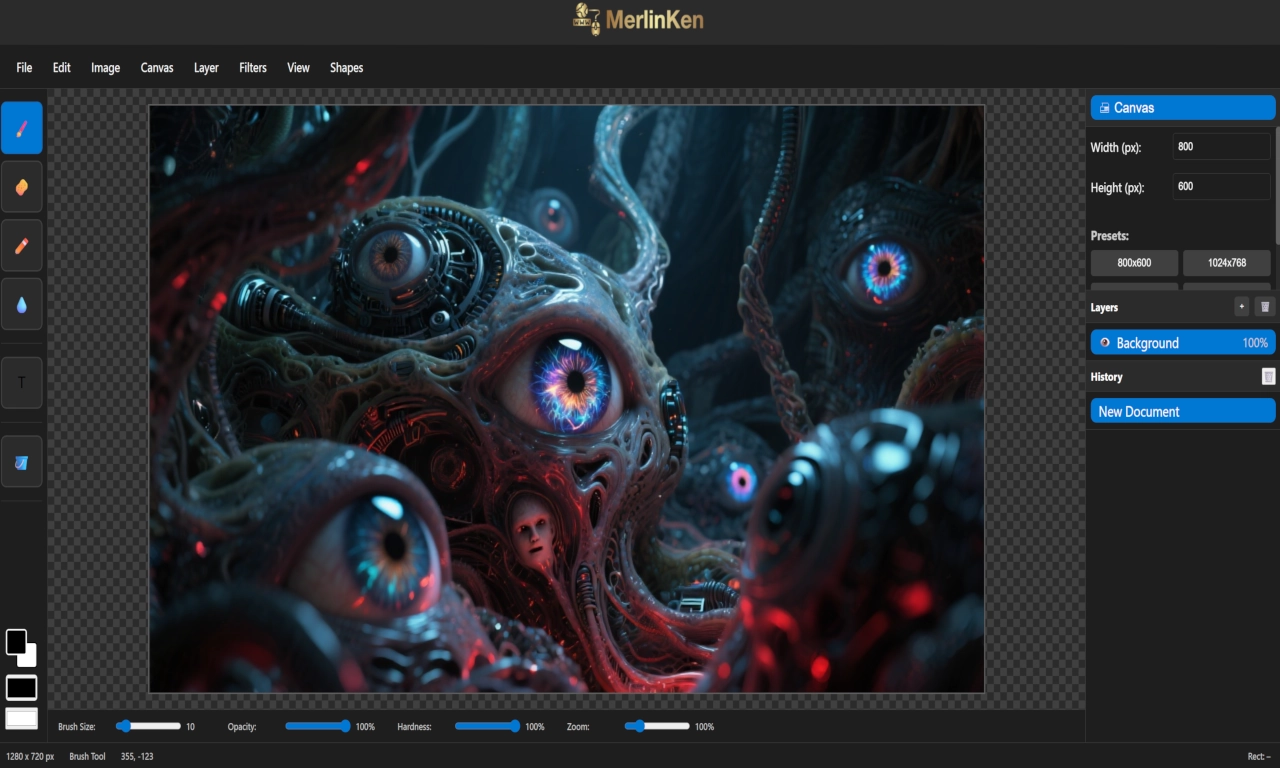
About the App
Introducing K-Paint: Image Editing, Reimagined
K-Paint is a browser-based image editor built for creators who want to get things done — fast. No bloated menus, no hidden features. Just the essentials, laid out with precision and purpose. Born from the frustration of navigating GIMP’s complexity, K-Paint strips away the noise and delivers a clean, intuitive workspace tailored for real-world use.
From Friction to Flow
I designed K-Paint for myself — because I needed something that worked the way I think. If a feature’s missing, I build it. If a tool’s buried, I surface it. That’s the philosophy. And it’s already working. I’ve used it to create, refine, and explore without ever feeling lost.
Core Features
K-Paint includes everything you need to start editing right away:
- File Tab: New, Open, Save, Save As
- Edit Tab: Undo, Redo, Move, Crop, Selection
- Canvas: Presets (800×600 to 2048×2048), plus custom size fields
- Filters: Blur, Sharpen, Grayscale, Invert, Sepia, Brightness
- Shapes: Rectangle, Ellipse, Line
- Drawing Tools: Brush, Pencil, Erase, Eyedrop, Text, Flood Fill
- Sliders: Size, Opacity, Hardness, Zoom — all live and adjustable
- Colour Picker: Foreground and background selection
- Mouse Coordinates: Live feedback for shape sizing and placement
Work in Progress
Layers are in development, and most tools already have shortcut keys (currently fixed). The View tab will be removed in future builds to streamline the interface.
What’s Next
K-Paint will grow as I do. Planned features include background removal, smart compression, generative fill, and object selection with AI-assisted cleanup. It’s not just a tool — it’s a living extension of my creative process, supported by my AI companions and built to evolve.
“K-Paint isn’t trying to be everything. It’s trying to be exactly what I need — and nothing more.”
Preview